Годує кота креветками, а сама їсть гречку на воді
Comedy |
2026-04-28 08:31:28
 Українська
 English
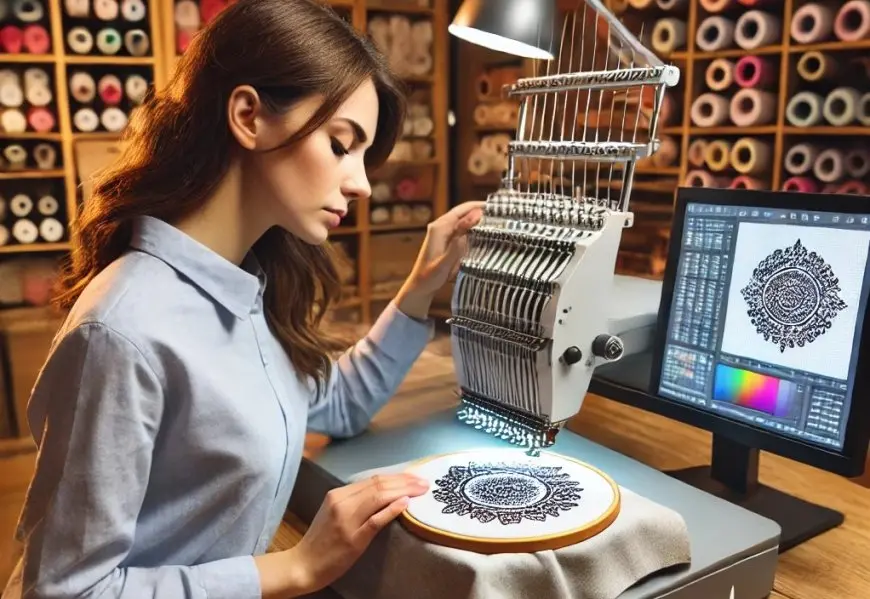
You have a crisp logo on your screen and a Pfaff embroidery machine ready to stitch it. You save the image to a USB, plug it in, and nothing happens. Or worse, the machine starts stitching but the design looks distorted and messy. This is the moment when many people realize that embroidery machines do not speak the same language as your computer. Regular image files contain visual data, but your Pfaff machine needs precise stitch instructions to guide the needle. The process of Pfaff Embroidery File Conversion is what transforms your artwork into a file your machine can actually understand and stitch flawlessly.
Pfaff embroidery machines support several specific file formats that contain stitch commands rather than pixel data. The format you need depends on your machine model, as older and newer Pfaff machines use different file types .
VP3 is the modern standard format for newer Pfaff machines like the Creative Icon, Creative 2170, Creative 2134, and Smart 300e . This format is also shared with Husqvarna Viking machines and is widely supported by professional digitizing software .
VIP is another format used by both Pfaff and Husqvarna Viking machines, commonly found on models like the Creative 2170 and 2140 series . A .VIP file contains vector-based needle coordinates, thread color changes, and density settings required to automate stitching .
PCS is the format for older Pfaff machines, including the Creative 7570, 7560, 2124, and 2140 series . The PCS file holds stitch coordinates, color sequences, trims, and pathing instructions that guide your machine .
VP4 is the newest format, used by the Creative Icon and other modern machines, offering expanded capabilities and larger embroidery areas .
Other supported formats include HUS, SHV, PCD, PCQ, and PCM, which are also compatible with various Pfaff models .
Standard image formats like JPG, PNG, or PDF only store visual information. They may look clear on your computer screen but contain no technical stitching data. Without proper conversion into a Pfaff-compatible embroidery file, your machine cannot interpret them .
Embroidery files like VP3, VIP, or PCS are completely different. They store information about where each needle puncture goes, what type of stitch to use, when to change thread colors, and when to trim thread. This is why you need to convert your logo before it can be stitched.
The most reliable method for converting your logo is hiring a professional digitizing service. Skilled digitizers manually plan every stitch path, ensuring the logo looks sharp and runs perfectly on your specific Pfaff model .
Professional digitizers understand how stitch flow, underlay, density, and pull compensation work for different fabric types. This expertise helps them create designs that stitch cleanly without puckering or distortion . Most services start at around $10 per logo and offer same-day delivery, with rush options available in as little as 2 hours .
The real value lies in consistency. Professional digitizing prevents wasted fabric, thread, and production time by delivering machine-ready files that run smoothly on Pfaff machines . Many services also offer free unlimited edits and a money-back guarantee .
If you prefer to digitize your own designs, you need software that supports Pfaff formats. Options include Wilcom Embroidery Studio, Hatch, mySewnet, and open-source tools like Ink/Stitch . These programs allow you to manually adjust stitch settings for precise control over the final result.
The catch is that digitizing requires a steep learning curve. You must understand stitch types, densities, underlays, pathing, and fabric behaviors. Without proper training, you will likely face thread breaks, uneven stitching, and distorted designs.
Free online converters seem convenient. You simply upload your image and download a converted file within minutes. However, these tools often distort stitch density, remove fine details, and lose color information. They also struggle with complex or gradient logos. The result is usually a low-quality file that may not run correctly on your Pfaff machine .
The digitizing process follows a systematic approach. The digitizer starts by gathering the logo in the highest resolution possible, such as a PNG, AI, or PDF file . They then use professional software to assign stitch types, directions, density, and underlay to different parts of the design . Key parameters include density (how close stitches are), underlay (foundation stitches for stability), pathing (the order of stitching), and pull compensation (adjustments to prevent fabric distortion) . After assigning thread colors, the design is saved in the correct Pfaff format. The final step is testing the design on fabric before mass production to catch any issues .
Without proper conversion, you may face frequent thread breaks when stitch density is not set correctly . Misaligned designs occur when incorrect or missing underlay stitches cause the design to shift during embroidery . Poor scaling happens when logos that are not digitized properly fail to translate across different garment sizes . Machine errors can occur when using the wrong file format, causing the design to be rejected or stitched incorrectly .
Different Pfaff models support different formats. The Creative 7570 uses PCS format with a maximum embroidery area of 3.94 by 4.72 inches . The Creative 2170 uses VIP and VP3 formats with a maximum area of 6 by 9 inches . The Creative Icon uses VP3 and VP4 formats with a maximum area of 14.11 by 13.78 inches . Always check your machine manual to confirm the correct format before converting your logo.
Converting your logo for Pfaff embroidery machines is not as simple as changing a file type. It is a detailed process where every stitch must be planned for accuracy, durability, and a professional finish. Without proper conversion, even the best-designed logo can fail when stitched on fabric.
Whether you choose to digitize yourself using professional software or outsource to experts, the key is understanding what your Pfaff machine needs. Professional digitizing services offer the most reliable results, with manual planning, fabric-specific optimization, and testing to ensure flawless performance. When quality matters, investing in expert conversion saves time, money, and frustration.